This case study covers how I worked through the problem, what worked, what did not, and the interaction design decisions that ultimately moved the numbers.
Date :
2025
Time Taken :
1-2 Months
My Role :
End-End Design Process
Introduction
Bewakoof is one of India's larger D2C fashion brands, mostly selling to college students and young adults who are price conscious and care a lot about how clothes actually fit on them.
This case study covers two phases of work I did on their Product Detail Page. The first was fixing a metric problem. The second was a full visual revamp of the same page. In this case-study I'm covering the phase I of the project which is fixing the go to cart metric. I owned the design end to end on both.
Problem
Over several weeks, the "Go to Cart" metric on the PDP had been quietly declining. It came up in a regular sync between the product and design teams, flagged by the head of product. The data was clear, fewer users who added a product to their cart were actually going to the cart to complete the purchase. I was given full ownership of solving it.
We did not have heatmaps or session recording tools at the time. What we had was the metric itself and the page in front of us. So I had to reason from what I could observe directly.
I looked at the moment a user tapped "Add to Cart" and felt the interaction was doing too little.
Looking at the old interaction, these were the problems:
The confirmation that a product was added to cart was easy to miss
The CTA changed from "Add to Bag" to "Go to Bag" as the next step, but it was a subtle text swap that most users could overlook
There was no urgency or motivation to go to the cart right now instead of later
Solution
The core idea was simple. The old interaction was not broken, it was just too easy to ignore. A subtle text change from "Add to Bag" to "Go to Bag" was doing all the heavy lifting, and most users were missing it entirely.
So I redesigned the whole moment from scratch.
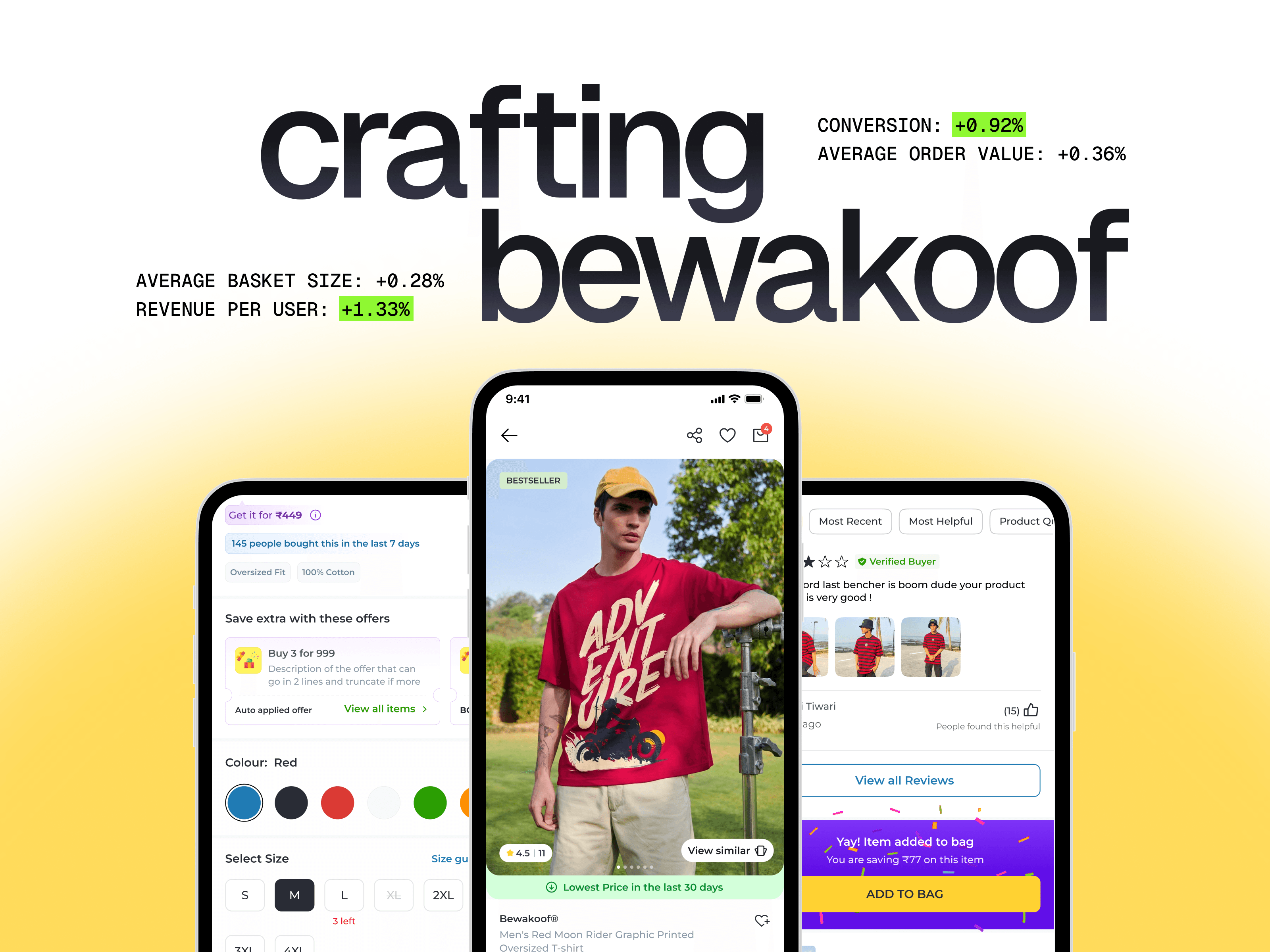
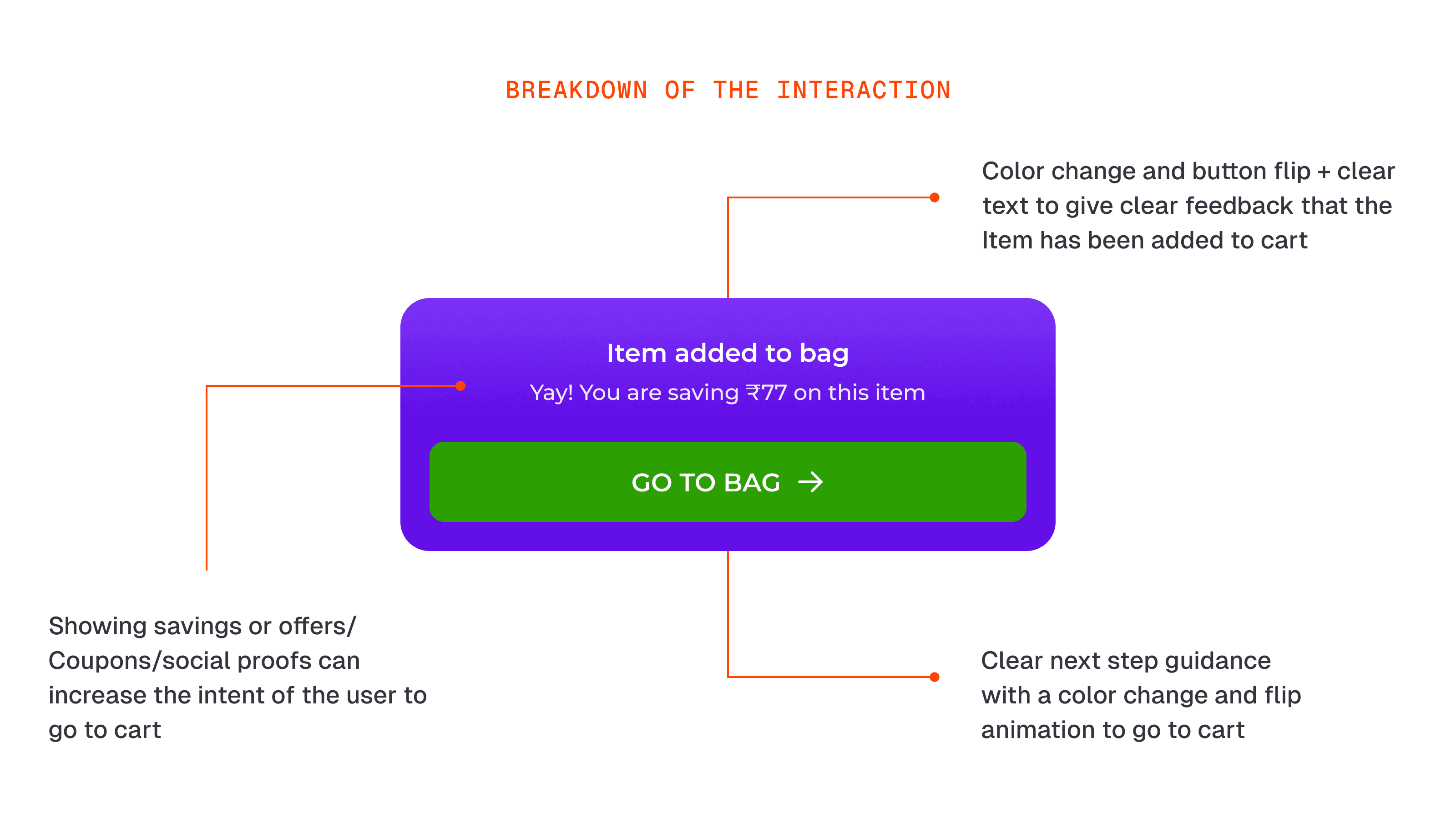
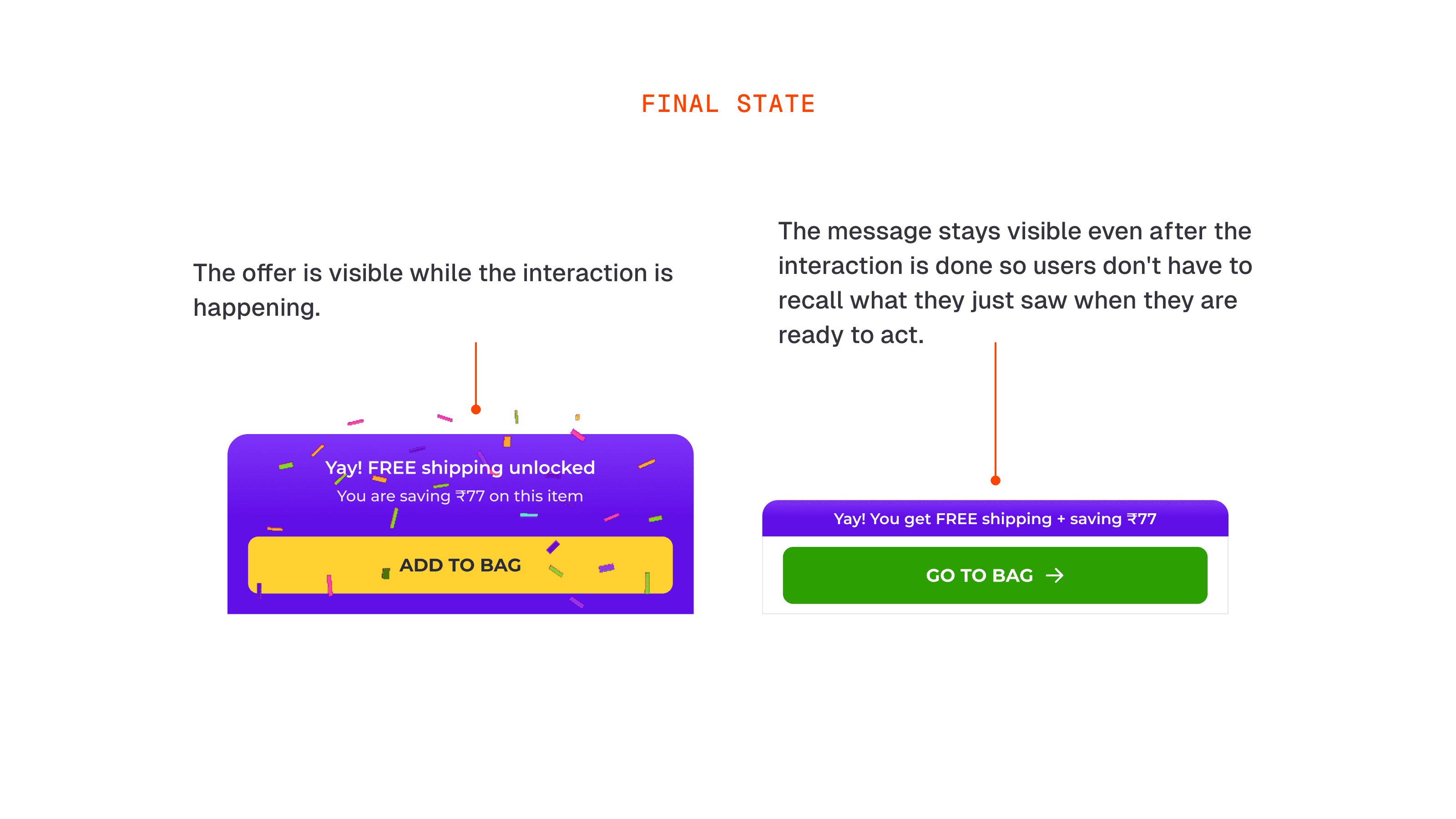
When a user taps "Add to Bag," the interaction now gives them clear feedback that the product was added, shows them a reason to go to cart right now like a coupon unlocked or free shipping, and then flips the button to "Go to Bag" so the next step is impossible to miss.
The whole thing takes a few seconds. But it takes the user from "did that even work?" to "oh nice, let me go check my cart."
Explorations
When I started thinking about the problem, I came up with three directions.
The first was animating the cart icon. When a user tapped "Add to Bag," the cart badge would update, the icon would shake, and a sparkle lottie would play. The thinking was that a visible change on the cart icon would give users feedback and naturally pull them toward it. But when we reviewed it internally, two problems showed up. The animation was happening in the top right corner while the CTA was sitting at the bottom center. Two things changing at once, on opposite ends of the screen. People were not catching the top animation at all. And even when they did, it still did not give them a clear next step. It solved feedback but not direction.
The second was a product image animation. After tapping "Add to Bag," the product image would duplicate itself, fly into the cart icon, and then the button would change to "View Bag." Looked fun in theory. In practice it felt confusing and took too long. A few people thought it looked like a screenshot being taken. It was leaning too much into delight and not enough into clarity.
Designing decisions behind the Interactions
The interaction had three jobs to do.
First, make it obvious that the product was added to cart. Sounds basic but the old interaction was failing at this. Users were tapping the button and not really sure if anything had happened.
Second, tell them what to do next. Once they know the product is in the cart, the interaction should naturally point them toward the next step without them having to figure it out.
Third, show them something relevant that helps them make a confident decision to go to cart. If they just unlocked free shipping, they should know. If a coupon got unlocked, they should know. If there is a sale ending soon, they should know. This information was always there, the interaction just was not surfacing it at the right moment. Showing it right after they add a product to cart is when it is most useful to them.
The whole interaction was designed to take a user through all three of these moments, one after the other, in just a few seconds.
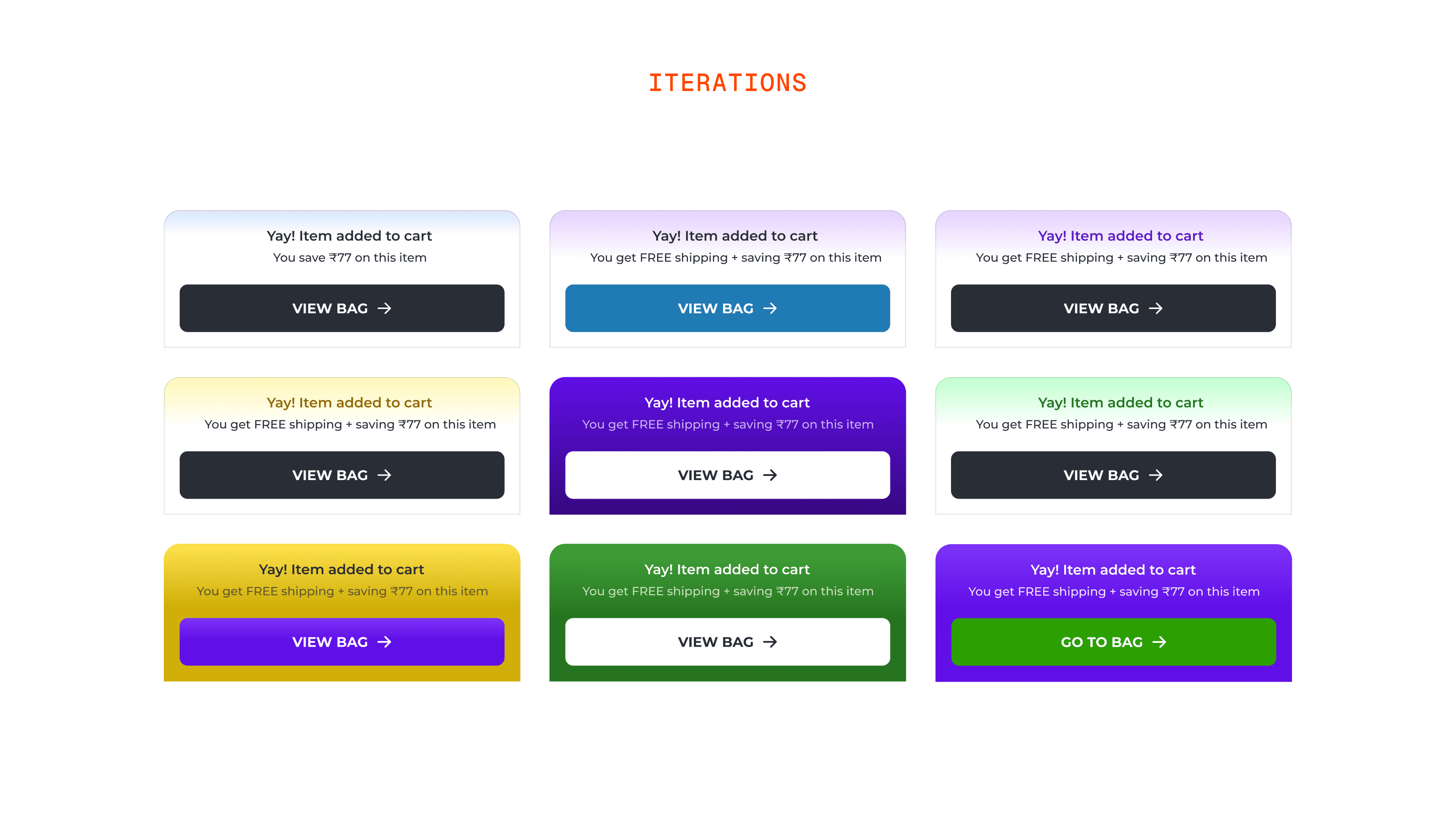
Colors: On colors, I went through a lot of variations before landing on purple and green. Purple was not a Bewakoof brand color at the time. I was working on a few things simultaneously including how the brand should communicate offers and coupons, and I made a call to introduce purple as the color for anything offer related across the product. It was bold, rich, and had never been used before so it would stand out. Green for the "Go to Bag" button was straightforward. It universally signals success, confirmation, and safe to proceed.
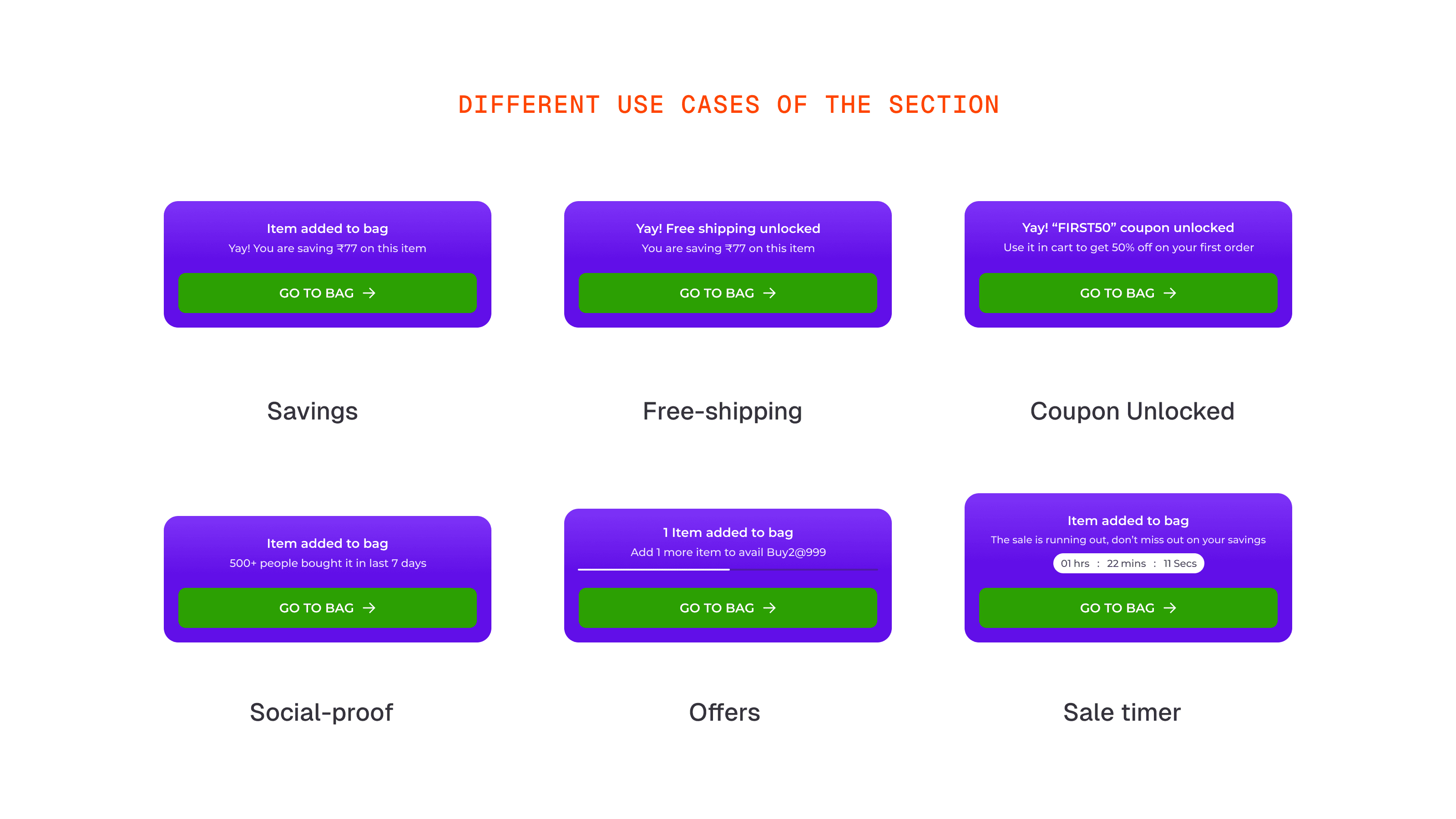
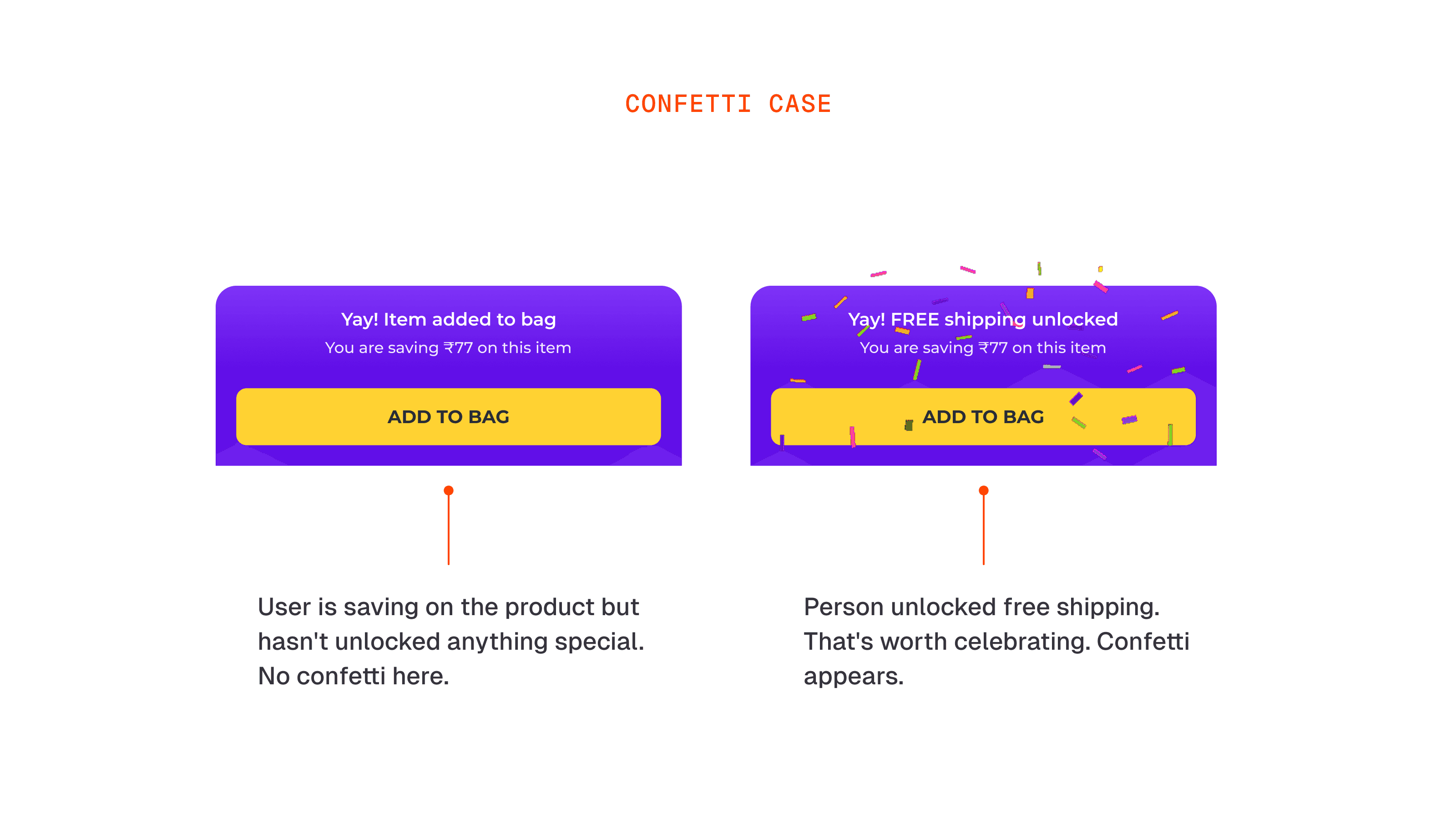
Use Cases : The interaction needed to work across different scenarios. A user saving money on a product. A user unlocking free shipping. A user getting a coupon code. Each of these is a different message but the same interaction wrapper.
Confetti Case: One decision we made early was around the confetti. It only appears when the user has genuinely unlocked something, free shipping, a coupon, an offer. It does not appear when we are just showing basic savings. The reasoning was simple, you do not throw a party when nothing special has happened. Celebrating a standard price cut would have made the confetti feel cheap and over time users would stop responding to it.
Final State Design: The message in the settled state was a deliberate call I made. After the animation ends and the button has flipped, the contextual message stays visible above the "Go to Bag" button. I did not want users to have to remember what they saw during the animation at the exact moment they need to decide whether to go to cart. Keeping it visible means the motivation is still there when it matters most.
Challenge
Along with the new interaction, I made one more change. The original behaviour was that the sticky button would scroll away once the product content ended and recommendations started. I thought keeping it visible across the entire page would help push conversions further.
It did not.
When the numbers dipped, the scroll behaviour was the first thing we questioned. Users who were still on the fence would scroll down to explore recommendations and the button was following them all the way down. It was too pushy at the wrong moment.
Iteration & Final Solution
To fix this, I refined the sticky behavior of the “Add to Cart” button. Instead of keeping it sticky throughout the entire PDP, it now stays visible only while the user is viewing content related to the current product like images, description, and reviews.
Once users scroll down to explore other product shelves or similar items, the button gracefully scrolls away with the page. This removed the pressure of having a CTA constantly hovering which, in hindsight, felt like a salesman hovering over your shoulder while you browse.
This tweak preserved the improved interaction for serious buyers, while giving undecided users the breathing room to explore, and it worked. The add-to-cart numbers and conversions bounced back.
Impact
The project led to a measurable uplift across key metrics. User conversion increased by 0.92% and revenue per user saw a 1.33% boost. We also observed a rise in average order value (+0.36%) and basket size (+0.28%).
Conclusion
This project taught me that even small interaction changes can have a big impact. Fixing the “Go to Cart” flow improved clarity and intent, and the PDP revamp brought consistency and a smoother user experience. It was a long project that tested me, but I’m glad I stuck with it and learned a lot along the way.